AI Integration in Modern Mobile Apps: Where Should the Intelligence Live?
A practical guide for mobile engineers on on-device AI, cloud AI, privacy, structured intents, security boundaries, and hybrid AI architectures.
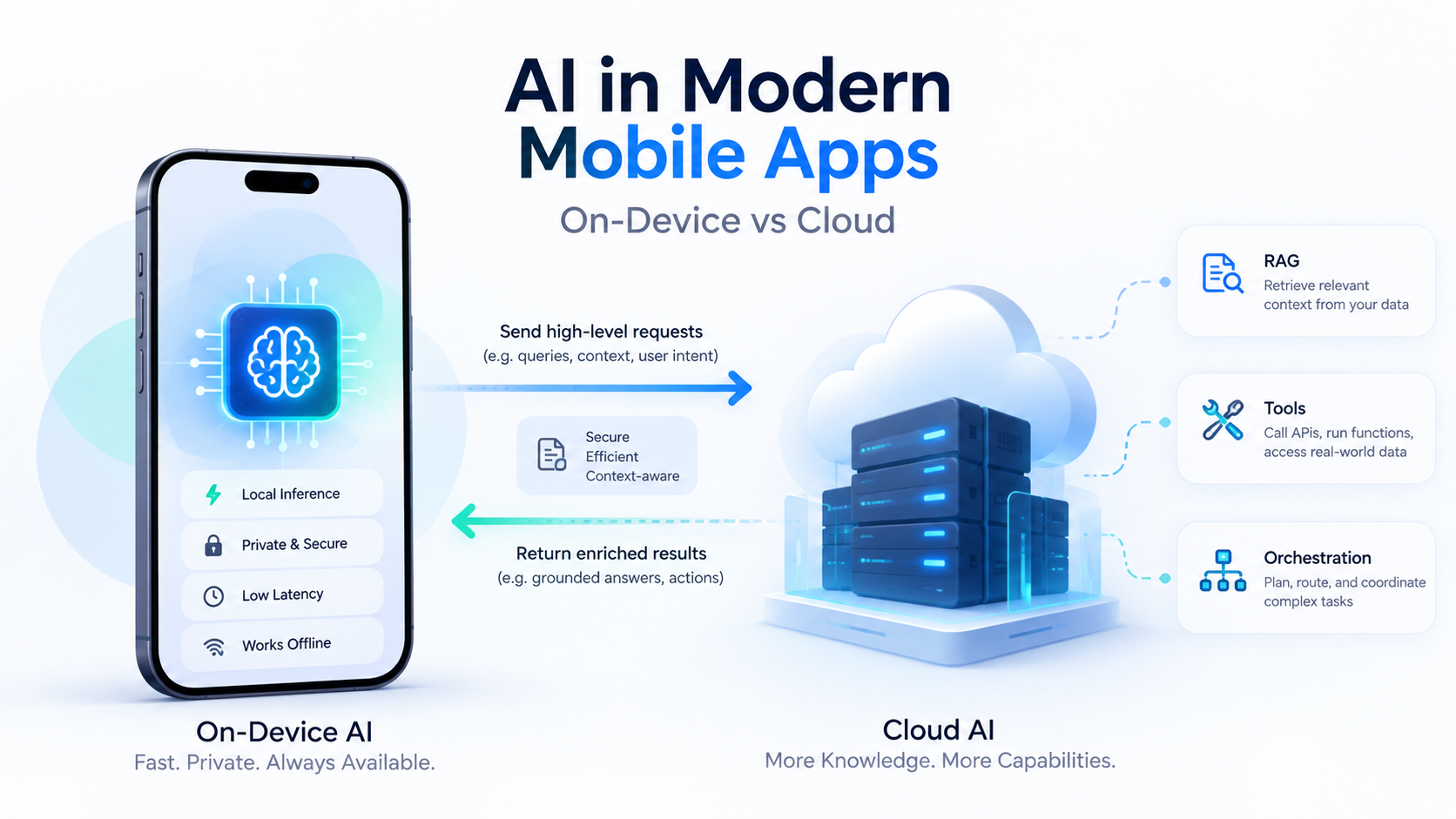
Generative AI discussions often focus on backend patterns: RAG, embeddings, reranking, agents, tool calling, and evaluation pipelines.
For mobile engineers, however, there is another architectural question that comes first:
What intelligence should happen on the device before we send anything to a backend or an external AI provider?
Modern mobile platforms are increasingly capable of running AI locally. A useful way to model this in a mobile architecture is to introduce what we can call an AI Capability Layer.
The goal of this layer is not to replace the application. It is to help the application understand the user better, process data closer to the user, and reduce unnecessary reliance on cloud AI.
AI Should Not Replace the Application
Assume a banking application already supports these operations:
TransferMoney
ShowTransactions
FreezeCard
FindNearestATM
DownloadStatement
Traditionally, the user navigates the UI until they reach the correct feature.
With AI, they might simply write:
"وقف الكارت بتاعي عشان ضاع."
An on-device model could convert that natural-language request into something structured:
{
  "intent": "freeze_card",
  "parameters": {}
}
The application then maps this to:
FreezeCardUseCase
At that point, AI has finished its job.
Authentication, authorization, business rules, backend communication, auditing, and actually freezing the card still belong to the normal application architecture.
The desirable flow is:
Natural Language
       ↓
Local AI
       ↓
Structured Intent
       ↓
Validation / Allowlist
       ↓
Existing Application Use Case
       ↓
Backend
Not:
User
 ↓
LLM
 ↓
Do whatever the LLM decides
That distinction is critical.
An LLM is probabilistic.
Your application behavior should remain deterministic where correctness matters.
The On-Device AI Layer
A useful way to think about mobile AI is this split between interpretation and execution:
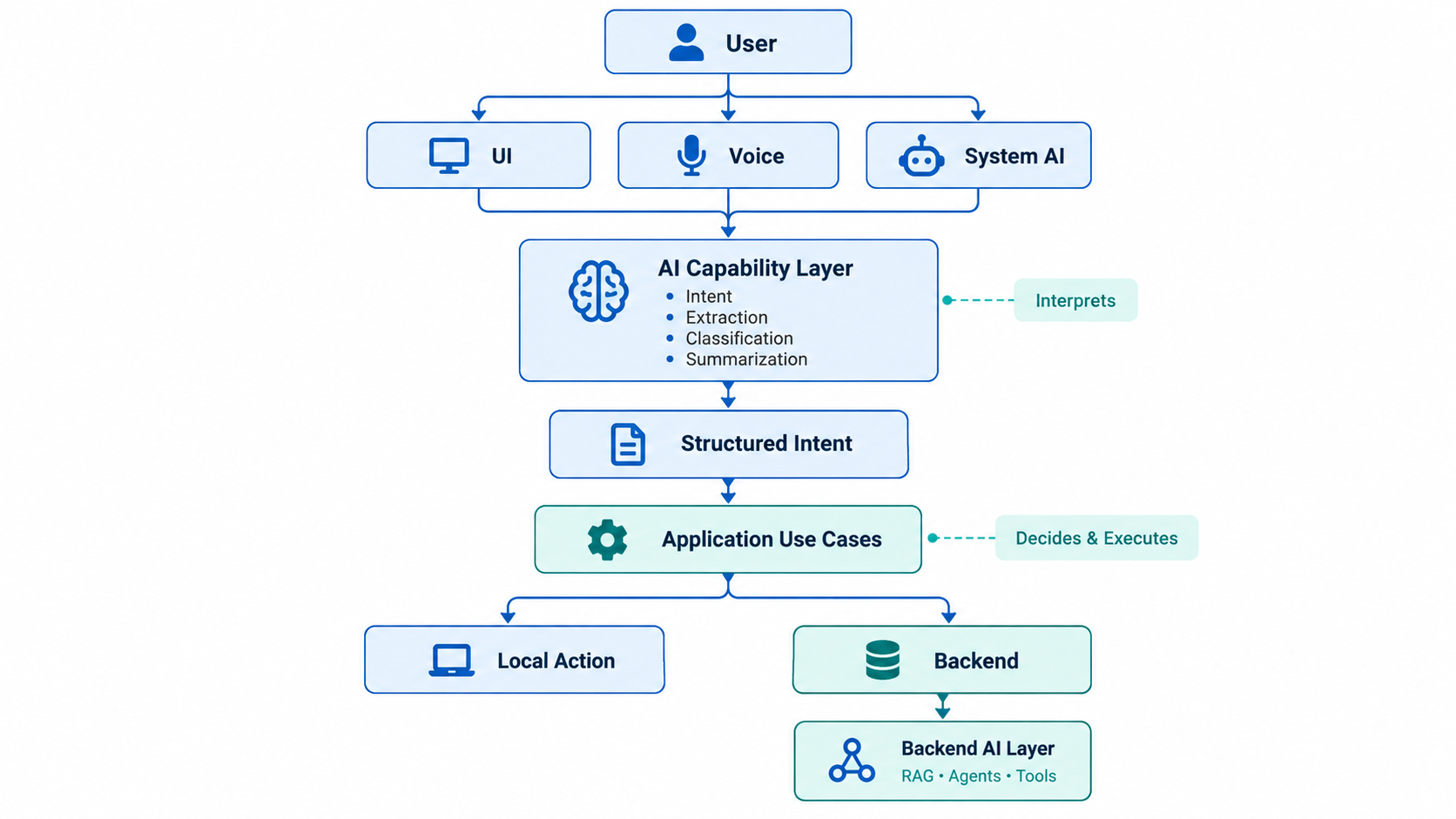
The AI layer interprets.
The application layer decides and executes.
That one line is one of the most important architectural rules in modern app design.
Natural Language as a New UI
One of the most interesting mobile use cases is treating natural language as another interaction mechanism.
Today we already have:
Touch
Keyboard
Camera
Voice
AI effectively adds:
Intent
Instead of navigating:
Services
 → Appointments
 → My Appointments
 → Appointment #324
 → Reschedule
 → Tomorrow
the user could write:
"غيرلي معاد بكرة لو فيه حاجة بعد ٤."
The local model could generate:
{
  "intent": "reschedule_appointment",
  "appointment": "current",
  "requested_date": "tomorrow",
  "preferred_time_after": "16:00"
}
The app would then execute normal application code:
GetAvailableSlotsUseCase
and display the available options.
The model does not need access to the appointment database.
It does not even necessarily need internet access.
Its responsibility is simply:
Human language → Application language
This is an extremely powerful pattern for mobile applications.
AI Does Not Always Mean LLM
This distinction matters.
Sometimes the correct solution is not a language model at all.
For example:
Scan QR code
→ Barcode scanner

Read an ID document
→ OCR / Vision model

Detect a face
→ Face detection

Translate simple text
→ Translation model

Speech → Text
→ Speech recognition
These are still AI capabilities, but a specialized model is usually cheaper, faster, smaller, and more predictable than an LLM.
A useful rule is:
Use the smallest model that solves the problem.
Do not use an LLM where deterministic code or a specialized ML model can do the job.
When On-Device AI Makes Sense
Local AI is especially attractive when the task is:
Private
The input contains information we would rather not send anywhere.
Examples:
Messages
Photos
Contacts
Documents
Clipboard contents
Personal notes
If the device can perform the operation locally, sending the raw data to a remote AI service may be unnecessary.
Small and Bounded
Examples:
Rewrite this message.
Summarize this page.
Extract date and location.
Classify this request.
Describe this image.
Determine which app feature the user wants.
These are strong candidates for local models.
Latency-Sensitive
For something such as:
"Open my last invoice."
waiting for:
Mobile → Backend → AI Provider → Backend → Mobile
just to identify an intent can be unnecessary if the device can resolve it locally.
Offline-Capable
A local model allows certain features to keep working without connectivity.
This is especially useful for:
- classification,
- rewriting,
- short summarization,
- extraction,
- speech processing,
- image understanding,
- local search assistance.
But Local AI Has Limits
Running locally does not automatically mean it is the correct architecture.
Mobile devices have constraints:
Limited memory
Limited context windows
Battery constraints
Thermal constraints
Hardware fragmentation
Model availability differences
This creates an important architectural consequence:
Never assume that your AI feature will behave identically across every device.
Device support is only one part of capability detection. Language and locale support also matter. A feature that works well for English on one device may not provide the same quality for Arabic, mixed-language input, or regional dialects. Treat model availability, locale support, and task quality as runtime capabilities rather than installation-time assumptions.
For a Flutter application, a sensible abstraction might be:
abstract interface class AiCapability {
  Future<AiResult> execute(AiRequest request);
}
with implementations such as:
IOSFoundationModelAi
AndroidOnDeviceAi
CloudAi
Then the application can decide:
Local AI available?
      ↓ yes
Run locally
      ↓
Success?
      ↓ no
Use cloud fallback
This is much safer than coupling product logic directly to a specific local model or vendor API.
Hybrid AI Will Probably Be the Common Mobile Architecture
For many applications, the answer is not:
Local or Cloud
It is:
Local first, cloud when necessary
Consider:
"عايز أعرف ليه الطلب بتاعي اترفض وأعمل إيه."
Step 1 — Local AI:
{
  "intent": "explain_rejected_request",
  "requires_server_data": true
}
Step 2 — The app calls the backend:
GET /requests/{id}
Step 3 — The backend returns:
{
  "status": "rejected",
  "reasonCode": "MISSING_DOCUMENT"
}
That may already be enough for a deterministic UI.
No LLM is required.
But suppose the user asks:
"اشرحلي السبب بشكل بسيط وقولي المستند المطلوب إيه."
Now the backend may use:
RAG
+ Policies
+ User Request State
+ Cloud LLM
and return a grounded explanation.
The resulting flow becomes:
Device
    ↓
Simple interpretation
    ↓
Application logic
    ↓
Backend
    ↓
Complex AI only when necessary
This can improve:
Privacy
Latency
Cloud cost
Reliability
at the same time.
Privacy: Minimize Before You Send
One of the most useful responsibilities of mobile AI can be reducing what leaves the device.
Imagine an insurance application where the user writes:
"أنا عبد الله جابر، رقم موبايلي 01xxxx، العربية خبطت امبارح الساعة ٨ عند السويس وعايز أبلغ عن الحادث."
Instead of sending the complete sentence to a cloud LLM, a local model can extract:
{
  "incident_type": "vehicle_accident",
  "time": "yesterday 20:00",
  "location": "Suez"
}
The app may already know the user's identity through authentication.
There may be no reason to send their name or phone number to the AI provider.
This pattern can be thought of as:
Local Data Minimization
Raw Sensitive Input
        ↓
On-Device Processing
        ↓
Minimal Structured Representation
        ↓
Backend / Cloud AI
This is often safer than:
Send Everything
        ↓
Ask Cloud Model to Figure It Out
But On-Device Does Not Mean Secure
This is one of the most dangerous assumptions developers can make.
Code running inside a mobile application should always be considered client-side code.
A motivated attacker may inspect:
Application binaries
Assets
Prompts
Configuration
Local databases
Network traffic
Runtime memory
and may modify application behavior on compromised devices.
Therefore:
System prompts are not secrets.
And:
Business rules are not protected because they are inside a prompt.
And most importantly:
Never ship long-lived AI provider secrets inside the application.
If a provider supports client-side access, use a mechanism designed for mobile clients, such as:
- short-lived credentials,
- scoped tokens,
- attestation,
- application integrity checks,
- a controlled gateway,
- provider-specific client security mechanisms.
The Biggest Security Mistake: Giving the Model Authority
Consider:
"Transfer 20,000 EGP to Ahmed."
The model extracts:
{
  "intent": "transfer_money",
  "recipient": "Ahmed",
  "amount": 20000
}
That output should never mean that the transfer now happens.
Instead:
LLM Output
    ↓
Schema Validation
    ↓
Resolve Ahmed → Beneficiary ID
    ↓
Business Validation
    ↓
Display Confirmation
    ↓
User Authentication
    ↓
Backend Authorization
    ↓
Execute Transfer
The AI proposed an action.
It did not authorize the action.
A safe principle is:
AI may suggest an action. The application decides whether that action is allowed.
Structured Output Is Almost Mandatory
Mobile apps should rarely consume arbitrary LLM prose as application logic.
Bad:
Model:
"The user probably wants to cancel their reservation."
and then:
if (result.contains('cancel')) {
  // ...
}
Please don't.
Prefer:
{
  "intent": "cancel_booking",
  "booking_id": "B123"
}
validated against:
AllowedIntent
AllowedParameters
BusinessRules
And ideally represented as actual application types:
sealed class UserIntent {}

class CancelBookingIntent extends UserIntent {
  final String bookingId;

  CancelBookingIntent(this.bookingId);
}
The model can be fuzzy.
The boundary between AI and the application should not be.
Where Should Each Type of AI Live?
| Requirement | Local AI | Backend AI |
|---|---|---|
| Intent classification | Strong fit | Usually unnecessary |
| Text rewrite | Strong fit | Good |
| Short summary | Strong fit | Good |
| OCR / image preprocessing | Strong fit | Sometimes |
| Extract form fields | Strong fit | Good |
| Offline feature | Required | Impossible |
| Large knowledge base | Limited | Excellent |
| RAG | Limited / mobile-specific | Excellent |
| Complex reasoning | Limited | Better |
| Enterprise data access | Limited / cached data only | Preferred |
| Multi-user information | Avoid | Backend |
| Long-running agent | Poor fit | Good |
| Cross-service orchestration | Poor fit | Excellent |
| Sensitive raw personal data | Prefer local processing | Only when required and controlled |
| Authoritative business decisions | Never AI alone | Backend rules |
| Expensive external actions | Never AI alone | Controlled backend |
Different Apps Need Different AI Architectures
Content, News, and Reading Apps
Good local candidates:
Summarization
Translation
Rewrite
Topic classification
Semantic navigation
Typical architecture:
Mostly Local AI
+
Cloud Optional
The risk is relatively low because the model usually operates on content already available to the user.
E-Commerce
A user may write:
"عايز لابتوب للـAI في حدود ٣٥ ألف."
Local AI can translate that into:
{
  "category": "laptop",
  "budget_max": 35000,
  "purpose": "AI"
}
Then the backend remains responsible for:
Product Search
Inventory
Pricing
Filtering
Recommendations
Cloud AI may help later with richer product comparisons.
Typical architecture:
Local Understanding
+
Backend Data
+
Optional Cloud AI
Government and Enterprise Applications
Good local candidates:
Intent detection
Document classification
OCR preprocessing
PII reduction
Form pre-filling
Backend responsibilities:
Authentication
Permissions
Records
Policies
RAG
Workflow
Audit
Typical architecture:
Local Preprocessing
+
Controlled Enterprise Backend AI
Sending raw documents directly from the mobile application to an arbitrary public AI API should generally not be the default architecture.
Banking and FinTech
Local AI can help with:
Navigation
Intent recognition
Transaction search
Spending categorization
Explanation preparation
But operations such as:
Transfer
Payment
Beneficiary creation
Card management
Credit decisions
must remain under deterministic business logic, server authorization, and explicit user confirmation.
The rule is simple:
AI = Assistant

NOT

AI = Authority
Healthcare
Local processing can be valuable for:
Transcription
Document preprocessing
Patient-entered text structuring
Private note summarization
But sensitive information leaving the device requires stronger governance, access control, legal review, and vendor controls.
For these applications, data minimization before cloud processing becomes especially important.
Messaging and Productivity Apps
These are among the strongest use cases for on-device AI:
Rewrite
Proofread
Summarize conversation
Extract tasks
Suggest response
Speech recognition
The device already contains the data.
Sending an entire private conversation to a cloud service just to change its tone may be unnecessary when a capable local model exists.
AI Can Also Expose Your App to the Operating System
There is another direction that is easy to miss.
Instead of only having:
AI inside your app
we increasingly have:
System AI
       ↓
Your App
Operating systems are moving toward application capabilities that can be exposed to system assistants and agents.
That means a future-friendly application should not assume that the UI is the only entry point into its capabilities.
Today we often design:
Screen → Button → Use Case
Increasingly, we may need:
UI
Voice
System AI
Automation
      ↓
Same Use Case
This makes clean application boundaries even more important.
A well-designed application could expose:
BookAppointmentUseCase
CancelBookingUseCase
TrackOrderUseCase
CreateReminderUseCase
to multiple interfaces.
The UI becomes one client of the application — not the only client.
Note: On Android, AppFunctions is promising here, but it is still in experimental preview at the time of writing. Think of this direction as important and real, but not yet something you should assume is broadly available in production across the ecosystem.
Flutter-Specific Considerations
In a Flutter application, the AI implementation should ideally remain behind an application-facing abstraction.
For example:
abstract interface class IntentResolver {
  Future<UserIntent> resolve(String input);
}
Possible implementations:
AndroidOnDeviceIntentResolver
IOSOnDeviceIntentResolver
CloudIntentResolver
The application layer should depend on:
IntentResolver
not on:
GeminiNano
AppleFoundationModels
VendorSdk
This protects the domain from platform-specific AI decisions.
A useful way to think about the boundary is:
Flutter / Dart
      ↓
IntentResolver
      ↓
┌──────────────────────────┐
│ Platform Implementation  │
├──────────────────────────┤
│ Android → On-device AI   │
│ iOS     → Foundation     │
│ Fallback → Cloud         │
└──────────────────────────┘
A typical flow could be:
User Input
   ↓
IntentResolver
   ↓
Structured UserIntent
   ↓
Validate
   ↓
Application Use Case
   ↓
Repository / Backend
That also makes fallback straightforward:
Try Local AI
     ↓
Unsupported / Failed?
     ↓
Use Cloud AI
without changing the business logic.
The Most Important Architectural Rule
Before introducing AI into a mobile feature, ask:
What is the minimum intelligence required to solve this problem?
Then work through this order:
Can deterministic code solve it?
        ↓ no

Can specialized ML solve it?
        ↓ no

Can an on-device model solve it?
        ↓ no

Send the minimum required data
to backend/cloud AI.
Not the other way around.
The naive architecture is:
Everything
   ↓
LLM API
   ↓
Hopefully something useful
A better modern mobile architecture is:
Deterministic Code First
        ↓
Specialized AI When Possible
        ↓
On-Device GenAI When Useful
        ↓
Cloud AI Only When Its Additional Capability
Actually Provides Value
This produces applications that are:
- cheaper,
- faster,
- more private,
- more predictable,
- easier to maintain,
- and easier to secure.
Most importantly:
AI should become another capability of the application — not the architecture of the application itself.